%20by%20Payump.jpg)



ChatGPT is Your New Intern: 10 Prompts to Automate Your Boring Admin Work Today
Let’s be honest for a second: How much of your workday is actually spent doing the job you were hired to do? 🤔
If you are like most professionals, the answer is probably "not enough."
You sit down to work on a big strategic project, and suddenly—ping!—an email needs a reply. Then a calendar invite needs rescheduling. Then you spend 45 minutes formatting a messy Excel sheet because someone sent you a CSV file from hell. 📉
This is the "Admin Tax," and it is expensive.
Research shows that knowledge workers spend anywhere from 30% to 50% of their week on "non-promotable tasks"—the busy work that keeps the lights on but doesn't get you a raise.
But here is the secret that the most productive people already know: You don't have to do it anymore.
A 2024 report by McKinsey found that employees are adopting generative AI faster than their bosses realize. While companies debate policies, smart employees are quietly building their own AI productivity hacks to reclaim their time.
You don't need a budget for a virtual assistant. You don't need permission from IT. You just need a strategy. Team members using AI generated email templates, AI-powered knowledge bases and AI for data entry save time, and sanity!
This guide is about achieving "Superagency"—using AI for work to act like a team of experts, freeing you to focus on the high-value strategy that actually moves the needle.
We are going to turn ChatGPT (or Claude, or Gemini, or Grok) into your new, eager, slightly chaotic AI agent intern who’ll be with you for the long term.
By the end of this article, you will have 10 copy-paste prompts to handle your worst tasks, schedule meetings quickly and deliver top notch customer service even when you feel like throwing your laptop out the window!
So, let's get to work! 👇
The Context: AI in Real-Time
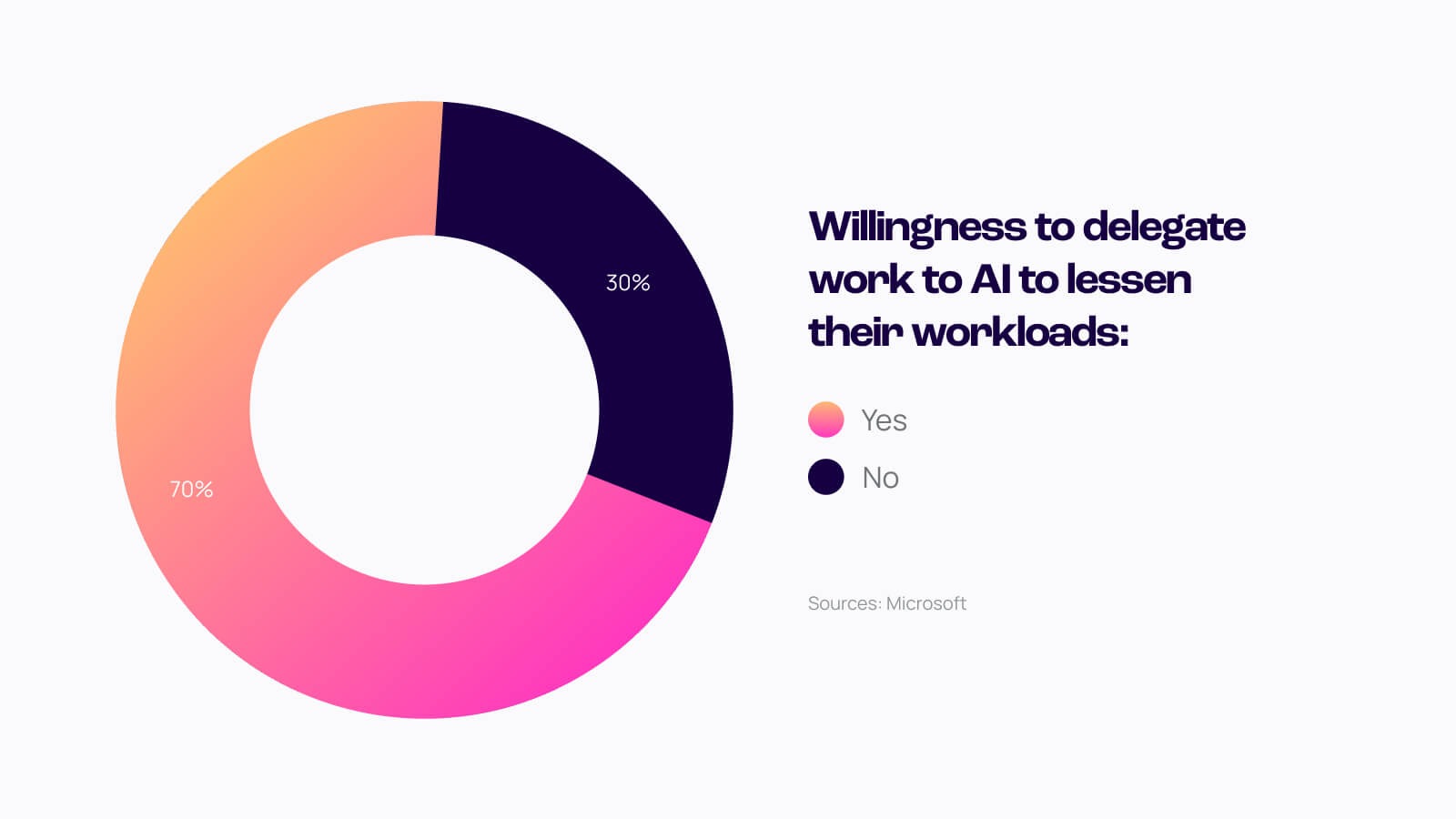
According to the Microsoft Work Trend Index, 70% of people would delegate as much work as possible to AI to lessen their workloads. You can be part of that 70%.
The Math: If admin automation saves you just 15 minutes a day, that is:
- 1.25 hours a week.
- 5 hours a month.
- 60 hours a year.
That is a week and a half of vacation you just earned back. Or a week and a half of learning a new skill. Or a week and a half of simply breathing.
The "Intern Mindset": How to Prompt Like a Boss 👔
Before we copy-paste the scripts, we need to fix the way you talk to the bot.
Most people use ChatGPT for work the same way they use Google. They ask a simple question and expect a perfect answer. When they get a generic, robotic response, they roll their eyes and say, "AI is overhyped."
The problem isn't the AI. It's the manager. (Sorry! 😅)
Ethan Mollick’s Golden Rule
Wharton Professor Ethan Mollick argues that we must "invite AI to the table." You shouldn't treat it like a search engine; you should treat it like a very fast, very eager, but slightly confused intern.
If you hired a real human intern and said, "Write an email," they would stare at you blankly.
- Write it to whom?
- About what?
- What's the tone?
- Are we angry or happy?
To master ChatGPT for office productivity, you need to give it the same context you would give a human.
The "Jagged Frontier" 🏔️
Here is the weird thing about using AI for work: It is inconsistent. Researchers call this the "Jagged Frontier."
- AI can pass the Bar Exam and write poetry in the style of Shakespeare.
- AI can also fail basic math problems or hallucinate facts about a meeting that never happened.
This means you must always "be the human in the loop." Never blind-fire an AI output. You are the editor; the AI is the drafter. You MUST fine-tune the AI output.
The Winning Formula: Context + Task + Persona
To get results that don't sound like a robot, use this formula for every single prompt:
- Persona: Who is the AI? (e.g., "Act as a Senior Project Manager.")
- Context: What is the situation? (e.g., "I am drowning in emails and need to prioritize.")
- Task: What exactly do you want? (e.g., "Summarize these into a to-do list.")
Ready? Let's look at the specific prompts that will save your sanity.
Category 1: Email & Communication (The "Inbox Zero" Hero) 📧
Email is the enemy of deep work. It fragments your attention and forces you into "reactive" mode. But how to use AI for emails isn't just about writing them faster—it's about thinking about them less.
Whether you are using the free ChatGPT or have integrated AI tools into your job hunt and daily workflow, these prompts will help you clear the backlog.
Prompt 1: The "Polite Refusal" 🛑
The Pain: You receive a request for a "quick coffee chat" or a new project. You want to say no, but you are a nice person and you don't want to burn bridges. So you procrastinate replying for 3 days.
The Fix: Let AI handle the emotional labor of rejection.
Copy This Prompt: "Act as a professional Executive Assistant. I need to decline the following request [PASTE REQUEST].
My reason is: I am currently at capacity with [Project X] and cannot take on new commitments until next quarter.
Task: Draft a polite, warm, but firm refusal. Do not apologize profusely. Offer to reconnect in 3 months. Keep it under 100 words."
Why It Works: It removes the guilt. You provide the logic ("at capacity"), and the AI wraps it in professional courtesy. You get to say "no" without spending 20 minutes agonizing over the wording.
Prompt 2: The "Summary from Chaos" 🌪️
The Pain: You come back from lunch to find a 25-email thread where three different departments are arguing about a deadline. You don't have the energy to read every single "Reply All."
The Fix: Use AI to extract the signal from the noise. This is one of the most powerful ways to leverage how to use ChatGPT for emails.
Copy This Prompt: "I am pasting an email thread below.
Task: Act as a Project Manager and summarize this conversation into 3 specific bullet points:
- The Core Issue: What are they actually arguing about?
- Decisions Made: Have you agreed anything?
- Action Required: Is there anything specific I (Justin) need to do?
[PASTE EMAIL THREAD]"
Why It Works: It forces the AI to ignore the fluff ("Hope you had a great weekend!") and focus purely on the outcomes. You can read the summary in 30 seconds and reply like you read the whole thing.
Prompt 3: The "Tone Polish" ✨
The Pain: You are angry. Maybe a vendor missed a deadline or a colleague dropped the ball. You write a draft, but you know it sounds passive-aggressive (or just aggressive-aggressive).

The Fix: Let AI be your PR filter.
Copy This Prompt: "I am frustrated with this situation, and my draft below is too emotional.
Task: Rewrite this email to sound professional, collaborative, and solution-oriented. Remove any passive-aggressive phrasing, but keep the deadline firm.
My Draft: [PASTE YOUR ANGRY DRAFT]"
Why It Works: It strips out the emotion but keeps the intent. This saves you from sending an email that HR might want to talk to you about later.
Category 2: Meetings & Minutes (The Scribe) 📝
Meetings are where productivity goes to die. But with ChatGPT for office productivity, you can automate the pre-work and the post-work.
Prompt 4: The Instant Agenda 📅
The Pain: You have a check-in meeting in 10 minutes. You haven't prepared anything. If you go in with no agenda, the meeting will ramble on for an hour and accomplish nothing.
The Fix: Generate a structure instantly.
Copy This Prompt: "I have a 30-minute check-in meeting with my [Marketing Team] regarding the [Summer Launch Campaign].
Task: Create a tight, time-boxed agenda to ensure we make decisions. Include:
- 5 mins: Updates on blockers.
- 15 mins: Decision time for [Creative Assets].
- 10 mins: Next steps.
Format this as a copy-paste agenda I can put in the calendar invite."
Why It Works: It imposes discipline on the meeting. By having an AI time-box the topics, you look organized, and you ensure the meeting actually ends on time.
Prompt 5: Action Item Extraction ✅
The Pain: You just finished a chaotic brainstorming session. You have rough notes scrawled on a notepad or a messy Google Doc. Now you have to turn that into a "Next Steps" email.
The Fix: This is classic ai productivity hacks territory.
Copy This Prompt: "Here are my rough notes from a meeting.
Task: Cleanup these notes and extract a clear 'Action Item' checklist. Format:
- [Owner Name]: [Task] (Due: [Date])
Notes: [PASTE ROUGH NOTES]"
Why It Works: It converts unstructured data (your messy typing) into structured data (a to-do list). This ensures no task gets lost in the noise.
Category 3: Data & Excel (The Wizard) 🧙♂️
You don't need to be a data scientist to use AI for admin. If you have ever stared at a spreadsheet trying to remember how VLOOKUP works, this section is for you.
Prompt 6: The Formula Fixer ➕
The Pain: You know what you want to do in Excel ("Match this name to that email"), but you can't remember the formula. You usually spend 15 minutes Googling "Excel formula for matching columns."
The Fix: Describe the problem in plain English.
Copy This Prompt: "Act as an Excel Expert. I have a spreadsheet with two tabs.
- Tab 1 (Employees): Column A is 'Employee ID', Column B is 'Name'.
- Tab 2 (Sales): Column A is 'Employee ID', Column B is 'Total Revenue'.
Task: Write an Excel formula I can put in Tab 1, Column C, to pull the 'Total Revenue' from Tab 2 by matching the 'Employee ID'."
Why It Works: It gives you the exact code. It will likely give you an XLOOKUP or VLOOKUP string that you can literally copy and paste into your cell.
Prompt 7: Data Cleanup 🧹
The Pain: You have a list of 500 names. Some are ALL CAPS. Some are lowercase. Some have extra spaces. You need them to look professional for a report.
The Fix: Admin automation at its finest.
Copy This Prompt: "I have a list of names that are formatted inconsistently.
Task:
- Convert all names to 'Title Case' (e.g., John Smith).
- Remove any duplicate names.
- Remove any leading or trailing spaces.
List: [PASTE LIST]"
Why It Works: Doing this manually would take an hour. AI does it in 3 seconds. Note: For massive datasets, ask ChatGPT to write a Python script or Excel Macro to do this, rather than pasting the whole list.
Category 4: Planning & Strategy (The Manager) 🧠
This is where we move from "Admin" to "Strategy." Once you have cleared your inbox, use AI for work to help you think bigger.
If you are looking to pivot your career into a role that requires more strategic thinking, check out our guide on high-paying AI careers to see where these skills are most valued.
Prompt 8: The Project Timeline 🗓️
The Pain: Your boss says, "We need to launch this new website in 4 weeks." You panic. Where do you even start?
The Fix: Work backward.
Copy This Prompt: "I need to plan a website launch in exactly 4 weeks. The deadline is immovable.
Task: Create a week-by-week project plan working backward from the launch date. Include:
- Critical milestones for each week.
- 'Go/No-Go' decision points.
- Buffer time for testing.
Present this as a table."
Why It Works: It overcomes "Blank Page Syndrome." The plan won't be perfect, but it gives you a solid skeleton to edit. It turns a scary deadline into manageable chunks.
Prompt 9: The "Devil's Advocate" 😈
The Pain: You have a great idea to pitch to your boss. You are excited. But you are terrified they will find a hole in your logic that you missed.
The Fix: Stress-test your idea before you enter the room.
Copy This Prompt: "I am preparing to pitch the following idea to my CEO: [DESCRIBE IDEA].
Task: Act as a skeptical, budget-conscious CEO.
- Give me 3 hard reasons why you would reject this.
- Ask me 3 difficult questions about ROI and implementation risks.
- Suggest how I can counter these objections."
Why It Works: It helps you prep for the hard questions. By the time you get to the real meeting, you have already answered the tough stuff.
Prompt 10: The SOP Generator 📖
The Pain: You want to delegate a task to a junior employee (or a freelancer), but explaining it takes longer than just doing it yourself. So you keep doing it yourself.
The Fix: Create a manual instantly.
Copy This Prompt: "I want to delegate the process of [Weekly Reporting]. Here are my rough notes on how I do it: [PASTE NOTES].
Task: Turn these notes into a step-by-step Standard Operating Procedure (SOP). Format:
- Objective
- Tools Needed
- Step-by-Step Instructions (Use bold headers)
- Common Troubleshooting"
Why It Works: Documentation is the key to scaling yourself. If you can write it down, you can hand it off. This prompt turns your brain dump into a training manual.
Start Small, Win Big 🏆
The goal of this article isn't to turn you into a robot. It's to stop you from working like one.
If you try to implement all 10 of these prompts tomorrow, you will get overwhelmed. Start small. Pick just one prompt from this list—maybe the "Polite Refusal" or the "Instant Agenda"—and use it today.
So, go ahead. Open ChatGPT. Introduce yourself to your new intern. And get your day back. 🚀
FAQs
What is the best way to use AI for work?
The best way to start is by treating AI as a "thought partner" rather than a search engine. Use it to draft emails, summarize long documents, and brainstorm ideas. Experts recommend picking one tool (like ChatGPT or Claude) and using it for everything for a week to learn its strengths.
Is ChatGPT safe for office productivity?
Yes, but you must be careful with data privacy. Never input confidential client data, passwords, or personal employee information. For sensitive admin automation, anonymize your data first or redact sensitive information.
Can AI automate my emails entirely?
Not completely, but it can do 90% of the work. Tools like ChatGPT can draft, edit, and tone-check your messages, but you should always review them before sending. Using AI for emails is about drafting faster, not removing the human element.
How do I use ChatGPT for admin tasks?
Focus on text-heavy and structured tasks. ChatGPT excels at writing SOPs, formatting messy lists, drafting agendas, and summarizing meeting notes. It struggles with tasks that require up-to-the-minute news or complex math without specific instructions.
Will using AI for work get me in trouble?
It depends on your company policy, but adoption is growing fast. A McKinsey report shows that 92% of companies plan to increase AI investment, and employees are adopting it faster than managers realize. Transparency is key—ask your manager about acceptable use cases.